

Now Reading: Best refresh rate for Gaming: 120Hz, 165Hz, or 240Hz?
-
01
Best refresh rate for Gaming: 120Hz, 165Hz, or 240Hz?

For most PC gamers, 165Hz is the best all-around monitor refresh rate. It delivers clearly smoother motion than 60Hz, provides useful headroom beyond 120Hz and 144Hz, and does not require the extreme frame rates that make 240Hz, 360Hz, or 500Hz worthwhile.
For PS5 and Xbox Series X|S, 120Hz is the practical target because supported console performance modes top out at 120Hz output. Competitive PC players who regularly exceed 200 FPS should consider 240Hz or faster. Casual players and graphically demanding single-player games can still feel excellent between 100Hz and 165Hz.
The best refresh rate for gaming is therefore not the largest number available. It is the highest rate your system can use consistently without forcing you to sacrifice the resolution, panel quality, response performance, ports, or features that matter more to your setup.
The Fast Answer: Best Refresh Rate by Gamer Type
| Type of gamer or setup | Recommended range | Best starting target | |
|---|---|---|---|
| Casual PC gaming | 100Hz to 144Hz | 120Hz or 144Hz | |
| Most PC gamers | 144Hz to 180Hz | 165Hz | |
| PS5 or Xbox Series X | S | 120Hz or higher | 120Hz support |
| Competitive PC gaming | 240Hz to 360Hz | 240Hz | |
| Serious esports | 360Hz to 500Hz+ | Hardware-dependent | |
| Cinematic 4K gaming | 120Hz to 165Hz | 144Hz | |
| Midrange 1440p gaming | 144Hz to 240Hz | 165Hz or 180Hz | |
| Budget 1080p gaming | 120Hz to 180Hz | 144Hz or 165Hz |
These ranges are starting points rather than strict rules. A well-tuned 144Hz monitor can be better than a poorly tuned 240Hz display, and a 120Hz OLED can have clearer pixel transitions than a faster LCD with slow response behavior.
The best refresh rate for gaming should always be judged alongside the monitor’s complete motion performance.
What Does Hertz Mean on a Gaming Monitor?
Hertz, abbreviated as Hz, describes how many times a monitor can refresh its image each second.
- A 60Hz monitor can refresh up to 60 times per second.
- A 120Hz monitor can refresh up to 120 times per second.
- A 165Hz monitor can refresh up to 165 times per second.
- A 240Hz monitor can refresh up to 240 times per second.
Higher refresh rates allow the monitor to present visual updates more frequently. This can make camera movement, mouse input, animation, and fast-moving targets look smoother when the computer produces enough frames.
Microsoft’s Windows refresh-rate guide explains that available rates depend on the display and its connection. Windows users can select a supported rate through Settings > System > Display > Advanced display.
Refresh rate is only the display ceiling. It does not guarantee that a game will run at the same frame rate.
Refresh Rate vs FPS: Why Both Matter
Refresh rate and frames per second describe different parts of the gaming system:
- Refresh rate is how frequently the monitor can update.
- FPS is how many frames the PC or console renders each second.
A 240Hz monitor does not make a game render at 240 FPS. The processor, graphics card, game engine, resolution, and graphics settings determine the frame rate.
The monitor can still be useful when FPS falls below its maximum. Variable refresh rate allows a compatible display to adjust its refresh timing as frame output changes. However, buying far more Hz than the system can produce may provide limited value.
This makes realistic FPS the first clue when selecting the best refresh rate for gaming on a particular PC.
For example:
- A system averaging 70 FPS will not fully use a 240Hz monitor.
- A system averaging 150 FPS pairs naturally with a 165Hz display.
- A competitive system sustaining 300 FPS can benefit from a 240Hz or 360Hz monitor.
The best refresh rate for gaming should match realistic performance in the games you actually play, not an ideal FPS number seen in a lightweight benchmark.
How Much Faster Does Each Refresh Rate Feel?
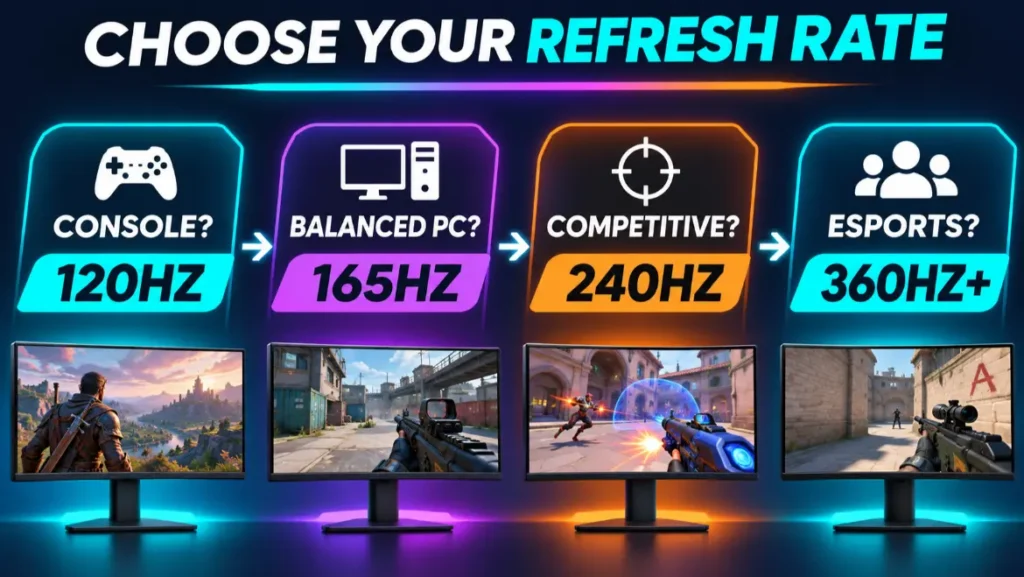
Refresh interval shows the maximum time between display updates. A higher refresh rate produces a shorter interval.
| Refresh rate | Time between refreshes | Change from 60Hz |
|---|---|---|
| 60Hz | 16.67 ms | Starting point |
| 75Hz | 13.33 ms | Small improvement |
| 100Hz | 10.00 ms | Clearly smoother |
| 120Hz | 8.33 ms | Half the 60Hz interval |
| 144Hz | 6.94 ms | Strong gaming baseline |
| 165Hz | 6.06 ms | Useful extra headroom |
| 180Hz | 5.56 ms | Fast mainstream gaming |
| 240Hz | 4.17 ms | Competitive tier |
| 360Hz | 2.78 ms | High-level esports tier |
| 500Hz | 2.00 ms | Specialized extreme tier |
The largest perceptual improvement is usually the move away from 60Hz. Increasing from 60Hz to 120Hz halves the refresh interval. Moving from 120Hz to 240Hz halves it again, but the absolute reduction is smaller, from 8.33 ms to 4.17 ms.
This is why additional Hz produces diminishing returns. Faster rates remain measurable and useful, but the improvement becomes more specialized as the number rises.
The best refresh rate for gaming is therefore not necessarily the highest tier in the frame-time table.
Is 60Hz Still Good for Gaming?
60Hz is usable, but it is no longer the best refresh rate for gaming when buying a dedicated gaming monitor.
It can still make sense for:
- Turn-based strategy games
- Card and board games
- Slower simulation games
- Older or low-powered PCs
- Players prioritizing a high-resolution professional display
- Games capped at 60 FPS
For action, shooters, racing, fighting, or rapid camera movement, 100Hz or more generally feels noticeably smoother.
If a 60Hz monitor is already working well for your games, an upgrade is optional. If you are buying a new gaming display, a 120Hz, 144Hz, or 165Hz model usually provides more useful longevity.
For a new purchase, the best refresh rate for gaming normally begins above 100Hz unless another requirement makes 60Hz necessary.
Is 120Hz Good Enough for Gaming?
Yes, 120Hz is good enough for most gaming, and it is especially suitable for consoles and graphically demanding PC games.
At 120Hz, the monitor refreshes twice as frequently as a 60Hz display. Camera motion, aiming, scrolling, and animation can appear substantially smoother when the source supplies enough frames.
120Hz is a strong fit for:
- PS5 and Xbox Series X|S
- Racing and sports games
- Fighting games
- Single-player action games
- RPGs and open-world titles
- 4K PC gaming
- Midrange graphics hardware
The reason some PC buyers choose 144Hz or 165Hz instead is availability and pricing. Many dedicated gaming monitors offer those faster rates without a large premium. If a 165Hz model has equally good image quality and costs nearly the same, the extra headroom is useful.
The earlier TopRated5 guide on whether 120Hz is good for gaming can serve as a supporting page once that article is published, while this guide addresses the wider refresh-rate decision.
Is 144Hz the Best Gaming Baseline?
144Hz remains a strong starting point for PC gaming. It is much smoother than 60Hz and does not demand the sustained frame rates needed to make 240Hz worthwhile.
144Hz suits:
- General PC gaming
- First-person shooters
- Battle royale games
- Racing games
- Fighting games
- 1440p midrange systems
- Players upgrading from 60Hz or 75Hz
The refresh interval at 144Hz is approximately 6.94 ms. That is only about 1.39 ms shorter than 120Hz, so the difference between them is far smaller than the difference between 60Hz and 120Hz.
If a 144Hz monitor is well-reviewed, affordable, and compatible with your PC or console, it remains a sensible purchase. Do not reject it simply because newer products advertise 165Hz or 180Hz.
For value-focused PC players, 144Hz can still be the best refresh rate for gaming when the monitor performs well and is priced correctly.
Why 165Hz Is the Best Choice for Most PC Gamers
165Hz is the best refresh rate for gaming for the largest group of PC buyers. It sits in a useful middle ground between mainstream 144Hz displays and more demanding 240Hz models.
Advantages include:
- Clearly smoother motion than 60Hz or 75Hz
- More headroom than 120Hz or 144Hz
- Realistic performance targets for many gaming PCs
- Wide availability at 1080p and 1440p
- Lower hardware demands than 240Hz
- Strong value in common 24-inch and 27-inch sizes
A 165Hz monitor refreshes every 6.06 ms. The difference from 144Hz is modest, so panel quality and price should decide between them.
Choose 165Hz when your system commonly produces between roughly 100 and 180 FPS, you play a mixture of competitive and single-player games, or you want a fast 1440p display without entering the 240Hz price and performance tier.
Samsung’s current gaming-monitor buying guidance groups 144Hz to 200Hz with fast-paced PC gaming and recommends 240Hz or more mainly for highly competitive players. Manufacturer advice is naturally promotional, but this tier division is a useful practical starting point.
When Is 180Hz Worth Choosing?
180Hz is a modest step beyond 165Hz. It is increasingly found on mainstream gaming monitors, but the small numerical difference should not dominate the decision.
- 165Hz interval: approximately 6.06 ms
- 180Hz interval: approximately 5.56 ms
- Difference: approximately 0.50 ms
Choose 180Hz over 165Hz when the two monitors are otherwise similar and the 180Hz option costs the same. Choose the better 165Hz monitor when it offers stronger response tuning, contrast, HDR, ergonomics, warranty, or connectivity.
Is 240Hz Worth It for Gaming?
240Hz is worthwhile for competitive PC players and enthusiasts whose systems can deliver high frame rates.
It is particularly useful for:
- Competitive first-person shooters
- Esports games with lightweight graphics
- Fast battle royale games
- High-level rhythm or fighting games
- Players prioritizing motion clarity over resolution
At 240Hz, the monitor refreshes every 4.17 ms. This provides more frequent updates than 144Hz or 165Hz, but the PC must produce enough frames to make the improvement meaningful.
A 240Hz monitor is less compelling when:
- Your games run below 100 FPS.
- You mainly play slow single-player titles.
- Reaching high FPS requires unattractive visual compromises.
- A better 165Hz monitor offers significantly stronger image quality.
- You are buying for PS5 or Xbox, which target a maximum 120Hz output in supported games.
For these buyers, 240Hz is unlikely to be the best refresh rate for gaming, even though it is technically faster.
The best refresh rate for gaming becomes 240Hz when competitive performance is a genuine priority, not simply because 240 is a larger number.
Who Needs 360Hz, 480Hz, or 500Hz?
These rates are specialized for competitive PC gaming. They can reduce refresh intervals further and show more stages of very fast motion, but they require exceptionally high frame rates and well-tuned hardware.
Consider 360Hz or faster if:
- Esports titles are your primary games.
- Your PC consistently produces several hundred FPS.
- You use competitive graphics settings.
- You already have a fast processor, graphics card, mouse, and low-latency setup.
- You accept the price, resolution, size, or image-quality tradeoffs.
For most players, the money is better spent on a stronger graphics card, better panel, higher resolution, useful HDR, improved audio, or a more ergonomic setup.
Very high refresh rates can be technically impressive without being the best buying decision for everyday gaming.
Best Refresh Rate for PS5
The best refresh rate for PS5 is 120Hz or higher, provided the monitor accepts a compatible 120Hz signal through HDMI.
Sony’s PS5 video-output guidance includes a 120Hz Output setting for games and displays that support it. The console does not use 144Hz, 165Hz, or 240Hz output modes simply because the monitor advertises those rates.
A faster monitor can still work with PS5, but confirm:
- 120Hz is supported over HDMI.
- The desired 1080p, 1440p, or 4K mode is accepted.
- The correct HDMI input supports the necessary bandwidth.
- Variable refresh rate works with PS5 if required.
- The game includes a 120 FPS performance mode.
For console buyers, HDMI compatibility matters more than the monitor’s maximum DisplayPort refresh rate.
On PS5, the best refresh rate for gaming is a verified 120Hz HDMI mode rather than an unused 240Hz DisplayPort specification.
Best Refresh Rate for Xbox Series X or Series S
The best refresh rate for Xbox Series X|S is also 120Hz or higher. Supported games can offer 120 FPS modes, while variable refresh rate helps with fluctuating frame output.
Xbox compatibility can differ from PC compatibility. A monitor may reach 165Hz or 240Hz over DisplayPort but accept only 60Hz through a particular HDMI input.
Confirm the supported HDMI modes, resolution, VRR format, color depth, and HDR capability. A monitor advertised as “240Hz” is not automatically a better Xbox display than a properly compatible 120Hz model.
For Xbox, the best refresh rate for gaming is likewise 120Hz when the monitor accepts the correct resolution and VRR format.
Best Refresh Rate for Different Game Genres
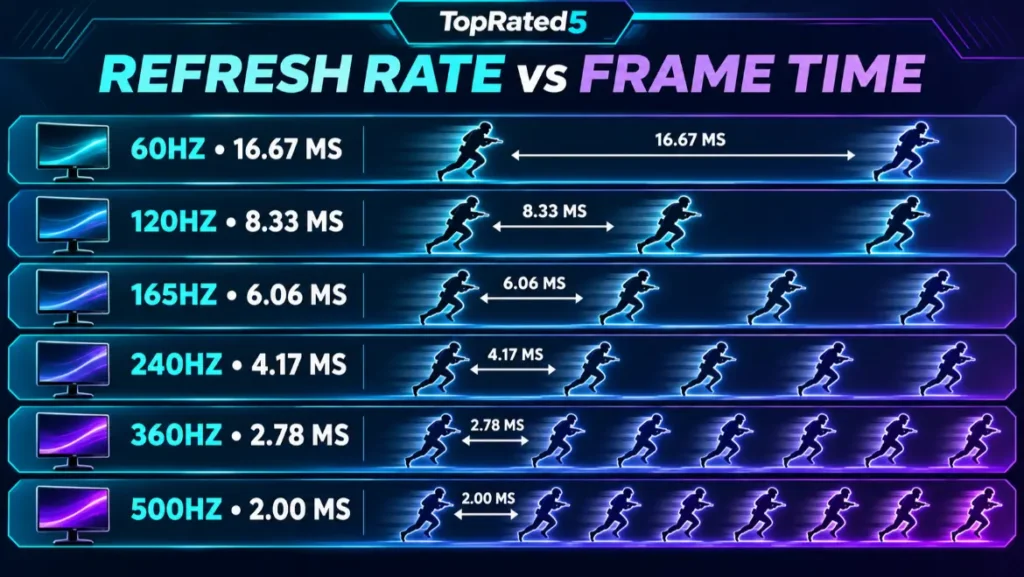
Story-Driven and Cinematic Games
Recommended: 100Hz to 165Hz
These games often prioritize visual quality, resolution, lighting, and detailed environments. A 120Hz or 144Hz monitor can feel smooth without demanding extreme frame rates.
Competitive FPS Games
Recommended: 240Hz to 360Hz
Competitive shooters benefit most from frequent updates and clearer fast motion. The PC must produce frame rates high enough to justify the display.
Casual Shooters and Battle Royale
Recommended: 144Hz to 240Hz
165Hz provides a strong balance for most players. Move to 240Hz when competitive performance is more important than graphics quality.
Racing and Sports Games
Recommended: 120Hz to 240Hz
Fast scenery and camera movement benefit from high refresh rates. Console players should target 120Hz, while PC enthusiasts may prefer 165Hz or 240Hz.
Fighting Games
Recommended: 120Hz to 165Hz
Many games have their own simulation or frame-rate limits, but a responsive high-refresh monitor remains useful for smooth presentation and low display latency.
Strategy, Simulation, and Turn-Based Games
Recommended: 100Hz to 165Hz
These genres benefit from smooth scrolling and cursor movement, but they rarely justify 360Hz or 500Hz hardware.
The best refresh rate for gaming changes by genre because the value of motion clarity differs between a tactical strategy game and a high-speed competitive shooter.
Best Refresh Rate by Resolution
1080p Gaming
Recommended: 144Hz to 240Hz
1080p is easier for a GPU to render at high frame rates. This makes it a strong resolution for competitive 165Hz, 240Hz, or faster monitors.
1440p Gaming
Recommended: 165Hz to 240Hz
For many PC gamers, 1440p at 165Hz is the most balanced combination of sharpness, smoothness, price, and hardware demand. Stronger systems can make good use of 240Hz.
Ultrawide 1440p Gaming
Recommended: 144Hz to 240Hz
Ultrawide resolutions require more rendering power than standard 1440p. A well-tuned 165Hz ultrawide can be a better fit than paying for refresh capacity the GPU rarely reaches.
4K Gaming
Recommended: 120Hz to 240Hz
4K is demanding. A 144Hz or 165Hz 4K monitor provides excellent headroom for most systems, while 240Hz 4K targets premium hardware and requires careful attention to connection bandwidth.
The best refresh rate for gaming at each resolution is limited by realistic GPU performance. Higher resolution and higher Hz both increase the demands placed on the system and display connection.
How to Match Monitor Hz to Your PC
Step 1: Measure Real Game Performance
Check FPS in the games you actually play at your preferred resolution and settings. Do not rely only on average performance from a different processor, graphics card, or quality preset.
Step 2: Consider the Minimums
A system averaging 180 FPS but frequently dropping below 100 FPS will not feel like a constant 180 FPS experience. Review frame-rate consistency as well as the average.
Step 3: Choose Useful Headroom
The monitor does not need to match FPS perfectly. A 165Hz display remains useful when games run between 90 and 160 FPS, especially with VRR.
Step 4: Plan for Upgrades
If a graphics-card upgrade is likely, some extra refresh-rate headroom can extend the monitor’s useful life. Do not sacrifice major image-quality features solely for hypothetical future FPS.
Step 5: Check the Connection
The graphics output, monitor input, and cable must support the target resolution and refresh rate together. A monitor’s maximum rate may be available only through one input.
Intel’s gaming-monitor guide emphasizes evaluating refresh rate together with resolution, response time, panel technology, and the complete PC output.
Why Response Time Matters as Much as Hertz
Refresh rate describes how frequently a new refresh can begin. Pixel response describes how quickly the pixels transition between shades.
A high-refresh monitor with slow pixel transitions can show:
- Ghost trails
- Dark smearing
- Blurred moving edges
- Reduced detail during motion
Aggressive overdrive can create inverse ghosting, producing bright or colored halos behind moving objects.
Do not assume an advertised 1 ms figure describes every transition. Look for independent measurements at several refresh rates, especially if you plan to use variable refresh rate.
The best refresh rate for gaming is valuable only when the panel can respond quickly enough to present those updates clearly.
Why Variable Refresh Rate Matters
Variable refresh rate lets a compatible monitor adjust its refresh timing to changing frame output. This can reduce tearing and judder when FPS moves below the monitor’s maximum.
A 165Hz monitor may spend much of a demanding game between 90Hz and 150Hz as the frame rate changes. VRR helps the display follow those changes instead of forcing frames into a fixed schedule.
Check:
- The supported VRR range
- AMD FreeSync compatibility
- NVIDIA G-SYNC Compatible status when relevant
- HDMI VRR support for consoles
- Whether motion-blur reduction disables VRR
- Performance near the lower end of the range
VRR does not replace good response performance or stable frame pacing, but it makes a high-refresh monitor more flexible.
Other Features That Matter More Than Extra Hz
Once a monitor reaches a suitable refresh range, these features may improve the experience more than another small Hz increase:
Resolution and Sharpness
A higher resolution can reveal more game detail and improve text clarity, although it increases GPU demand.
Panel Technology
OLED, IPS, and VA displays differ in pixel response, contrast, black levels, brightness, viewing angles, text presentation, and price.
HDR Performance
An HDR input label does not guarantee effective HDR. Brightness, contrast, black level, local dimming, color range, and tone mapping determine the result.
Input Lag
Most gaming monitors have low lag at their intended settings, but display processing and operating mode can affect latency.
Connectivity
Confirm DisplayPort, HDMI, or USB-C support for the intended resolution, refresh rate, VRR, HDR, and color depth.
Ergonomics
Height adjustment, tilt, swivel, VESA support, stand depth, and screen size affect daily comfort.
Warranty and Pixel Policy
Review coverage length, return terms, dead-pixel policy, and OLED burn-in coverage where applicable.
The best refresh rate for gaming should be part of a balanced monitor rather than the only impressive number on its specification sheet.
Common Refresh-Rate Buying Mistakes
Buying More Hz Than the PC Can Use
A 360Hz display is difficult to justify if the system normally produces 90 FPS.
Choosing 60Hz for a New Gaming Setup
Unless price, resolution, or a specific professional use demands it, a monitor above 100Hz usually provides a more satisfying gaming upgrade.
Assuming Higher Hz Guarantees Clearer Motion
Slow response or poor overdrive tuning can undermine a high refresh rate.
Ignoring Console HDMI Support
PS5 and Xbox use HDMI. A monitor’s maximum DisplayPort rate does not guarantee 120Hz console compatibility.
Lowering Resolution Only to Claim a Higher Rate
The fastest mode is not automatically the best-looking mode. Decide whether smoother motion is worth the reduction in sharpness.
Forgetting to Enable the Maximum Rate
Windows can leave a new gaming monitor at 60Hz. Open Advanced display and select the desired supported rate.
Comparing Hz Without Comparing Price
A well-priced 165Hz monitor may be better value than a premium 180Hz display with nearly identical performance.
Ignoring the Games You Actually Play
Competitive shooters and cinematic RPGs benefit from different balances of refresh rate, resolution, and image quality.
How to Choose Your Best Hz in Five Questions
Ask these questions before buying:
- Which platform am I using? Consoles should prioritize verified 120Hz HDMI support. PCs can use higher rates.
- What FPS does my hardware actually produce? Match the display to realistic frame output.
- Which games do I play most? Competitive shooters benefit more from 240Hz or faster than strategy or cinematic titles.
- Which resolution do I want? Higher resolutions require more GPU performance at the same frame rate.
- What am I sacrificing for extra Hz? Do not give up strong response tuning, contrast, HDR, ports, ergonomics, or warranty without a good reason.
If the answers remain unclear, 165Hz at 1440p is the safest all-around PC recommendation, while 120Hz support is the safest console requirement.
That simple split identifies the best refresh rate for gaming for most buyers without paying for performance their hardware cannot use.
For monitor brand options, see TopRated5’s gaming monitor comparison. Related setup and buying content is available in the Gaming Accessories category.
Frequently Asked Questions
What Is the Best Refresh Rate for Gaming?
165Hz is the best all-around refresh rate for most PC gamers. Console players should prioritize 120Hz support, while competitive PC players with high frame rates may benefit from 240Hz or faster.
Is 144Hz or 165Hz Better?
165Hz is faster, but the difference is small. Choose 165Hz when the price and overall quality are similar. A better 144Hz monitor can still be the stronger purchase.
Is 240Hz Overkill?
It can be overkill for slow games or systems that run below 100 FPS. It is useful for competitive games when the PC regularly produces frame rates well above 165 FPS.
Is 120Hz Enough for Console Gaming?
Yes. PS5 and Xbox Series X|S use supported 120Hz performance modes. A monitor with a higher maximum rate will still receive up to the console’s supported output.
Is 60Hz Bad for Gaming?
No, but it is less smooth than 120Hz, 144Hz, or 165Hz. It remains usable for slower games, basic systems, and titles capped at 60 FPS.
Can You Tell the Difference Between 144Hz and 240Hz?
Many experienced players can notice the difference during fast motion, but it is smaller than the jump from 60Hz to 144Hz. Response performance and FPS consistency influence how clear the difference appears.
Does a 240Hz Monitor Need 240 FPS?
No, but producing close to 240 FPS allows the monitor to show more unique frames. VRR helps when the frame rate remains below the maximum.
Is 4K 144Hz Better Than 1440p 240Hz?
4K 144Hz favors image detail and cinematic games. 1440p 240Hz favors competitive motion and is easier to drive at high FPS. The better option depends on the games and graphics hardware.
Does Higher Hz Improve Graphics Quality?
It improves motion frequency rather than texture detail, resolution, color, contrast, or HDR. A faster monitor can look smoother without producing a sharper static image.
How Do I Check My Current Monitor Hz?
In Windows, open Settings > System > Display > Advanced display. Select the monitor and check the active refresh rate and signal mode.
Final Verdict: Which Hertz Is Best for a Gaming Monitor?
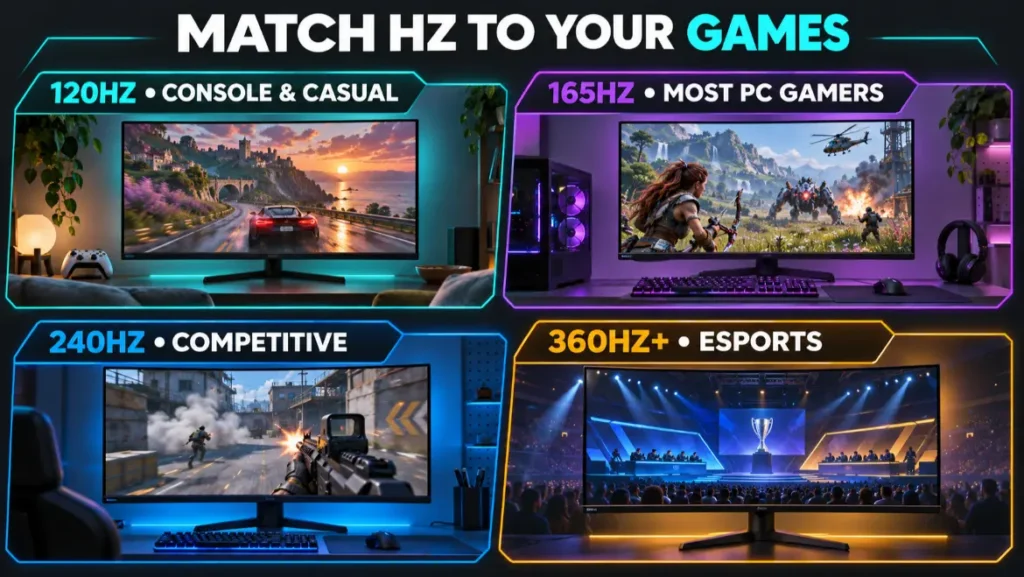
165Hz is the best refresh rate for gaming for most PC players. It provides a strong balance of smooth motion, realistic hardware requirements, product availability, and price.
Choose 120Hz for PS5, Xbox Series X|S, 4K cinematic gaming, or systems that typically stay below 120 FPS. Choose 144Hz to 180Hz for balanced mainstream PC gaming. Choose 240Hz when competitive games and high frame rates are priorities. Choose 360Hz to 500Hz+ only for specialized esports use with hardware capable of sustaining several hundred FPS.
Do not buy a gaming monitor by Hertz alone. Response time, overshoot, input lag, VRR, resolution, panel quality, HDR, ports, warranty, and ergonomics determine whether the monitor is genuinely good.
Ultimately, the best refresh rate for gaming is the rate that remains useful after all of those factors are considered together.
The smartest purchase is not the display with the biggest number. It is the monitor whose refresh rate matches your real games, hardware, resolution, and budget while preserving the image quality and features you will notice every day.
Related Posts

Stay Informed With the Latest & Most Important News
Previous Post
Next Post








-
 01is 24 inch monitor good for gaming? Is It the Right Size?
-
 02Are Curved Monitors Good for Gaming? Curved vs Flat Monitor
-
 03How to Connect a Gaming Monitor to a PC Without Losing Hz
-
 045 Best Gentle CBD Products for Pets: Lower-Strength Oils and Chews
-
 05Is 120Hz Good for Gaming? Enough or Too Slow?
-
 06Best refresh rate for Gaming: 120Hz, 165Hz, or 240Hz?