Now Reading: is 24 inch monitor good for gaming? Is It the Right Size?
-
01
is 24 inch monitor good for gaming? Is It the Right Size?


Yes, a 24-inch monitor is good for gaming, and it is often one of the best sizes for competitive 1080p play. It keeps the full game area within your view, fits smaller desks, costs less than many larger displays, and is easier for a modest graphics card to drive at high frame rates. A 27-inch monitor is usually better when you want 1440p sharpness, additional workspace, or a more immersive view.
Table of Contents
Quick Answer: is 24 inch monitor good for gaming?
A 24 inch gaming monitor is a strong choice if you play shooters, battle royale games, fighting games, MOBAs, or other fast titles from a normal desk distance.
It is also practical if your computer performs best at 1920 x 1080, you want 144 Hz or more without paying for a higher-resolution graphics card upgrade, or your desk cannot comfortably hold a 27-inch display.
Choose 27 inches instead if cinematic single-player games, simulation titles, 1440p detail, larger text, or multitasking are more important than keeping the entire screen in a compact field of view.
| Your priority | Better starting size | Why |
|---|---|---|
| Competitive 1080p gaming | 24 inches | Compact view and easier high-frame-rate performance |
| Small desk or bedroom setup | 24 inches | Requires less width and viewing distance |
| Affordable high refresh rate | 24 inches | Many 1080p high-refresh models target this size |
| 1440p gaming and productivity | 27 inches | More usable space with sharp QHD detail |
| Immersive RPGs and open-world games | 27 to 32 inches | A larger image can feel more cinematic |
| Couch-style console gaming | 32 inches or a TV | Easier to see from farther away |
Why 24 Inches Works So Well for Gaming
Monitor size changes how much of your vision the display occupies, but it also changes how densely a resolution is presented.
A 24-inch screen is large enough to show modern games clearly from a desk while remaining compact enough that you can scan the corners without much head movement.
That balance is particularly useful in competitive games. Health bars, the minimap, ammunition, team information, and movement at the edges stay relatively easy to monitor at once.
A larger screen is not automatically slower, but it can require more eye movement when viewed from the same close distance.
The HP monitor-size guide identifies the 23.8-to-24-inch range as suitable for competitive gaming and notes that Full HD is a natural resolution match at this size.
The ASUS monitor-size guide similarly positions 24-inch 1080p displays as a strong fit for esports and compact gaming setups.
If you want to compare current models after deciding on size, see the TopRated5 gaming monitor comparison. Treat that page as a product shortlist, while this guide helps you decide which size and specifications make sense first.
Is 1080p Sharp Enough on a 24-Inch Monitor?
For most gamers, yes.
A 24-inch 1920 x 1080 display has approximately 92 pixels per inch, depending on whether the actual panel measures 23.8 or exactly 24 inches.
That density is commonly comfortable at a normal desk distance. Game interfaces remain readable, edges look reasonably clean, and Windows usually does not require display scaling.
Resolution and size must be considered together:
| Screen and resolution | Approximate pixel density | Practical result |
|---|---|---|
| 24-inch 1080p | 92 PPI | Good balance of gaming performance and clarity |
| 24-inch 1440p | 122 PPI | Very sharp, but interface elements may appear smaller |
| 27-inch 1080p | 82 PPI | Larger image, but pixels are more noticeable up close |
| 27-inch 1440p | 109 PPI | Strong balance of detail, workspace, and gaming |
| 27-inch 4K | 163 PPI | Very sharp, but more demanding and often needs scaling |
The important advantage of a 1080p gaming monitor is performance.
Rendering 1920 x 1080 requires the graphics processor to produce fewer pixels than 2560 x 1440 or 3840 x 2160. That can make it easier to reach high frame rates, although the exact result depends on the game, graphics settings, processor, and graphics card.
If your PC produces 160 frames per second at 1080p but struggles near 90 at 1440p, a 24-inch 1080p high-refresh monitor may deliver the smoother experience.
A higher-resolution screen is not necessarily an upgrade if your system cannot maintain the performance you value.
Is 1440p Worth Using at 24 Inches?
A 24-inch 1440p monitor can look exceptionally sharp. Fine text, distant game details, and desktop content benefit from the increased pixel density.
However, the market offers fewer 24-inch QHD gaming monitors than 27-inch QHD models, and some users find desktop text small without scaling.
Choose 24-inch 1440p when you specifically want compact dimensions and high sharpness. Choose 27-inch 1440p when you want the same resolution displayed at a more comfortable physical size with additional usable workspace.
Do not assume that 1440p is always better for competitive play. It increases the rendering workload.
Competitive players often prefer 1080p because stable high frame rates and motion clarity matter more to them than extra environmental detail.
Refresh Rate Matters More Than Three Additional Inches
A 24-inch 60 Hz monitor can play games, but it will not feel as fluid as a well-tuned 144 Hz, 165 Hz, 240 Hz, or faster model when the gaming system produces enough frames.
Refresh rate describes how many times the display can update each second. The improvement from 60 Hz to 144 Hz is usually more noticeable during fast camera movement than changing from a 24-inch to a 27-inch screen with otherwise identical specifications.
Use these ranges as a practical starting point:
- 75 to 100 Hz: Suitable for casual gaming and everyday use when price matters most.
- 120 to 180 Hz: A strong range for most PC gamers and current console performance modes.
- 240 Hz and above: Most useful for competitive players whose systems can sustain very high frame rates.
Do not buy based only on the advertised refresh number. Check independent reviews for input lag, pixel response behavior, overshoot, flicker, and motion clarity at different refresh rates.
A poorly tuned 240 Hz panel can show more distracting artifacts than a well-tuned 165 Hz display.
Response Time and Input Lag Are Not the Same Thing
Monitor listings frequently advertise a 1 ms or 0.5 ms response time.
That number usually describes a manufacturer-selected pixel-transition measurement, not the complete delay between pressing a button and seeing the result.
Pixel response time affects how quickly pixels change color. Slow transitions can create blur, dark smearing, or ghost trails.
Input lag is the delay before the display shows the signal it receives.
Both matter, but one cannot be substituted for the other.
Look for reviews that measure performance across the monitor’s refresh range. Overdrive settings that look good at the maximum refresh rate can produce bright inverse-ghosting trails at lower frame rates.
If you use variable refresh rate, the monitor should behave well across the range you actually play in, not only at its advertised maximum.
Why Variable Refresh Rate Is Worth Having
Variable refresh rate, or VRR, allows a compatible display to adjust its refresh timing to the frames produced by the gaming system. This can reduce visible tearing and judder when frame rate changes.
The HDMI gaming-feature guidance explains that VRR lets a gaming source send frames when they are ready rather than forcing every frame into a fixed refresh schedule.
VESA’s DisplayPort Adaptive-Sync documentation similarly describes synchronized refresh as a way to provide smoother, tear-free gaming.
Look for verified compatibility with your graphics card or console. Labels such as AMD FreeSync, NVIDIA G-SYNC Compatible, VESA AdaptiveSync Display, and HDMI VRR describe related but not always identical implementations.
Check the supported refresh range, connection type, and device compatibility instead of relying on a logo alone.
Is a 24-Inch Monitor Good for PS5 or Xbox?
Yes, especially if you play at a desk.
A 24-inch 1080p or 1440p monitor can be a practical console display, but connection support matters more than screen size.
For PlayStation 5, Sony’s official PS5 display guidance states that compatible displays can accept 1440p at 60 Hz or 120 Hz.
Sony also documents VRR support on compatible HDMI 2.1 displays. Individual games must support the relevant performance mode, and a monitor’s HDMI ports may offer different capabilities from its DisplayPort connection.
Before buying a monitor for any console, confirm:
- The HDMI input accepts the resolution and refresh rate you plan to use.
- The monitor supports that mode over HDMI, not only over DisplayPort.
- VRR works with the console at the intended resolution.
- The monitor has audio output or speakers if you are not using a headset.
- The display accepts the console’s signal without forcing an unwanted resolution conversion.
A 24-inch console monitor is less suitable if you sit several feet away. From a couch, the image can feel small even when its technical compatibility is perfect.
24-Inch vs 27-Inch Monitor for Gaming
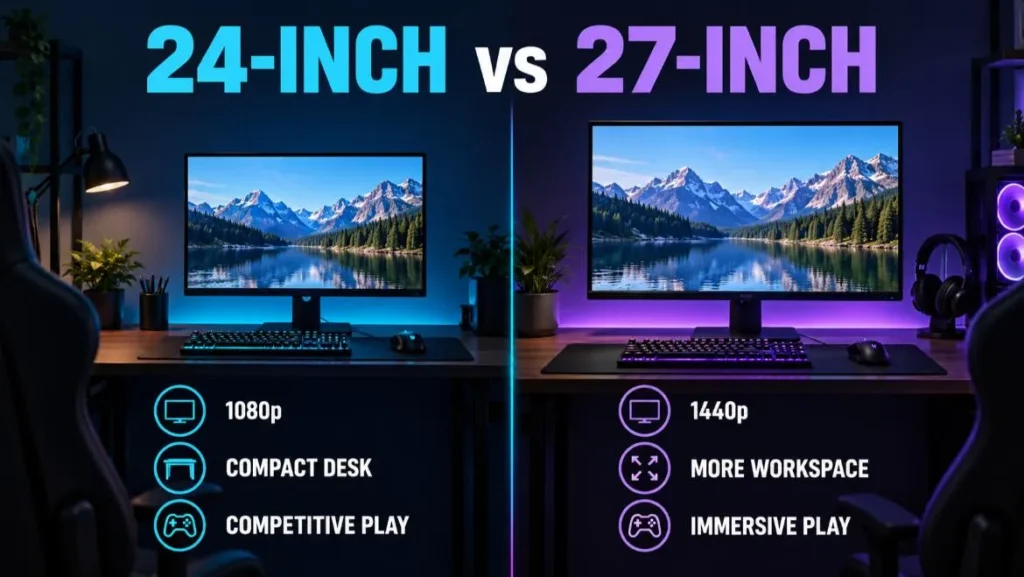
The 24 vs 27 inch monitor decision is not about which size is universally better. It is about matching size, resolution, viewing distance, game type, and graphics performance.
Choose 24 Inches When:
- You mainly play competitive shooters, MOBAs, fighting games, or battle royale titles.
- Your preferred resolution is 1080p.
- You sit close to the display at a conventional desk.
- You want a high refresh rate without placing unnecessary load on the GPU.
- Your desk is narrow or shallow.
- You want two monitors without occupying excessive space.
- Price matters more than cinematic scale.
Choose 27 Inches When:
- You prefer 1440p for sharper game detail.
- You play RPGs, strategy games, racing games, or visually rich single-player releases.
- You also edit media, study, work, or keep several windows open.
- You have enough desk depth to move the screen slightly farther away.
- You want a larger image without moving to a 32-inch or ultrawide display.
The best monitor size for gaming is the size that fits your seating distance and preferred resolution.
A 24-inch screen viewed at approximately arm’s length can feel substantial. A 27-inch model at the same distance feels more immersive but may require more eye movement.
How Far Should You Sit From a 24-Inch Gaming Monitor?
There is no mandatory viewing distance, but approximately 20 to 30 inches is a useful starting range for many desk setups.
Adjust the distance until you can see the whole display comfortably without leaning forward or turning your head to inspect the corners.
Move the monitor farther away if the edges feel overwhelming or your eyes constantly refocus. Move it closer if interface text is difficult to read, but do not compensate for poor readability by sitting uncomfortably close.
Text scaling, game interface settings, and correct prescription eyewear are better solutions.
Position the top portion of the screen near eye level, keep the display centered, and reduce glare from windows or lights. An adjustable stand or monitor arm can matter more for comfort than an additional inch of panel size.
Which Panel Type Is Best at 24 Inches?
IPS
IPS is the most balanced choice for many buyers. It typically provides wide viewing angles and consistent color, while modern fast-IPS gaming panels can deliver strong motion performance.
Quality still varies by model, so the IPS label alone does not guarantee fast response.
TN
TN remains relevant in specialized competitive gaming monitor models because it can prioritize very high refresh rates and motion clarity.
The tradeoffs can include weaker viewing angles and less impressive color than good IPS or OLED alternatives.
VA
VA panels often offer stronger native contrast, which can make dark scenes look deeper.
Some models show dark-level smearing in motion, so measured response behavior is particularly important.
OLED
OLED can provide near-instant pixel transitions, excellent black levels, and strong HDR potential.
However, 24-to-25-inch OLED choices are much less common than 27-inch models. Buyers should also consider price, text rendering, brightness behavior, and burn-in mitigation.
What Specifications Should You Prioritize?
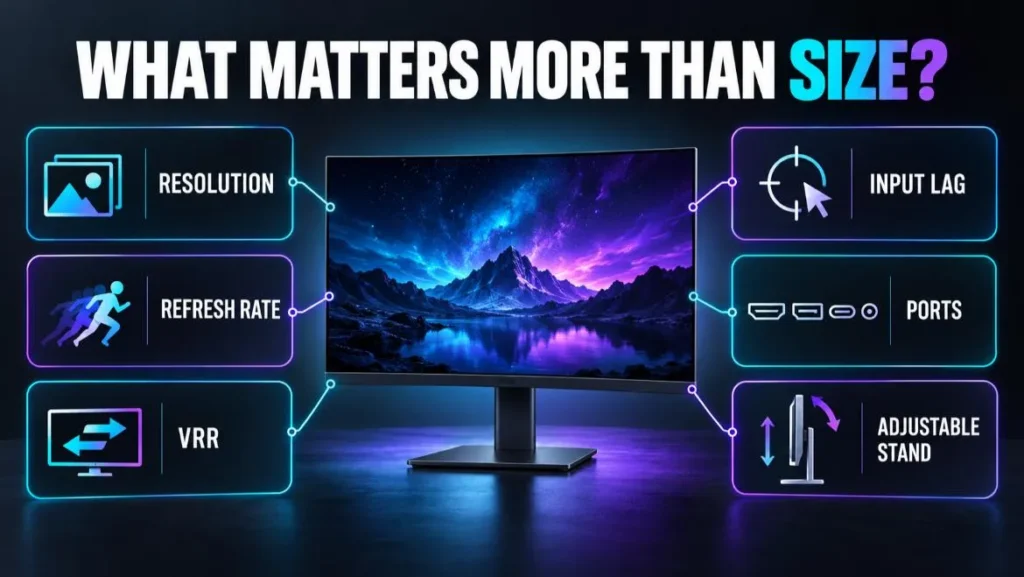
When shopping, use this order instead of choosing by size alone:
- Resolution: For most 24-inch buyers, start with 1080p. Consider 1440p if sharpness matters and your GPU can handle it.
- Refresh rate: A 144-to-180 Hz model is a strong general target. Buy 240 Hz or faster only when your games and system can use it.
- Measured motion performance: Look beyond the advertised millisecond claim.
- Input lag: Confirm that latency remains low at the refresh rates and resolutions you use.
- VRR support: Verify the range and compatibility with your PC or console.
- Ports: Check HDMI and DisplayPort versions, supported modes, headphone output, and USB features.
- Stand and mount: Height, tilt, swivel, and VESA mount support affect daily comfort.
- Image quality: Contrast, brightness, color accuracy, and uniformity vary widely.
- Warranty: Review dead-pixel terms, return conditions, and coverage length before ordering.
Our Gaming Accessories category can help you compare related setup components after you settle on the display size.
Keep the monitor decision tied to your complete system rather than buying the largest specification list.
Common Mistakes When Choosing a 24-Inch Monitor
Buying a Refresh Rate Your PC Cannot Reach
A 240 Hz monitor still works below 240 frames per second, but the premium may be wasted if your games usually run near 80 FPS.
Check realistic performance for your graphics card, processor, game, resolution, and preferred settings.
Assuming Every HDMI Port Supports Every Mode
The panel may be advertised at 180 Hz over DisplayPort while its HDMI input is limited to a lower refresh rate.
This is especially important for consoles and laptops.
Treating a 1 ms Claim as a Complete Performance Test
Response-time marketing does not replace measured reviews. Check overshoot and performance across multiple refresh rates.
Choosing 27-Inch 1080p Only Because It Is Bigger
A larger 1080p panel has lower pixel density.
It may still look acceptable in games, but text and fine edges can appear softer when viewed close to a desk.
Ignoring Ergonomics
A monitor with a fixed, low stand may force an uncomfortable posture. Budget for a VESA-compatible arm if the included stand lacks height adjustment.
Paying Extra for Weak HDR Branding
An HDR input label does not guarantee impactful HDR.
Strong HDR presentation depends on brightness, contrast, color capability, tone mapping, and often local dimming or self-emissive pixels.
Frequently Asked Questions
Is a 24-Inch Monitor Too Small for Gaming?
Not for a desk setup. It is large enough for modern games at a typical close viewing distance and is especially popular for competitive play. It can feel small when viewed from a couch or across a room.
Is 24 Inches Good for FPS Games?
Yes. A 24-inch screen helps keep the minimap, crosshair area, status information, and peripheral action within a compact view. Pair it with a high refresh rate, low input lag, and good response tuning.
Is 24 Inches Good for 1440p Gaming?
Yes, if you value high pixel density and do not mind smaller interface elements. The product selection is narrower than the 27-inch 1440p market, so compare availability and price before committing.
Is 27 Inches Better Than 24 Inches for Gaming?
It is better for 1440p detail, immersion, and mixed gaming-productivity use. It is not automatically better for competitive 1080p gaming, a small desk, or a PC that performs much faster at Full HD.
Is a 24-Inch 60 Hz Monitor Still Usable?
Yes for casual games, strategy titles, and gaming systems limited near 60 FPS. For fast action, 120 Hz or higher generally provides smoother motion when the connected system can supply enough frames.
Do Professional Gamers Use 24-Inch Monitors?
Competitive events and esports setups commonly use monitors in the 24-to-25-inch range. That does not mean every home gamer should copy tournament hardware. Competitive priorities differ from cinematic and productivity priorities.
Should I Buy Curved or Flat at 24 Inches?
A flat panel is usually the more practical choice at this size. Curvature has less visual impact on a small 16:9 display than on a large or ultrawide monitor.
Final Verdict
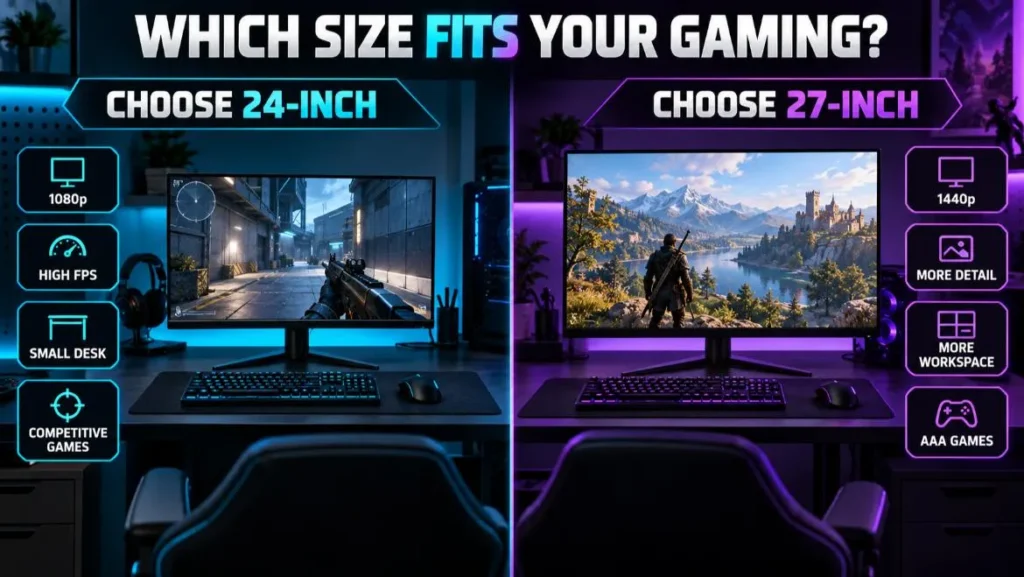
A 24-inch monitor is an excellent gaming size when you play at a desk, prefer 1080p, value high frame rates, or focus on competitive games.
It offers a useful balance of sharpness, visibility, price, and space efficiency.
Choose a 27-inch 1440p monitor if you want a more immersive picture, additional desktop room, or finer detail in single-player games.
Whichever size you select, prioritize measured motion performance, low input lag, VRR compatibility, the correct ports, and an adjustable setup. Those factors will influence the experience more than three additional inches alone.
Before buying, compare the monitor’s supported resolution and refresh rate over the exact connection you will use, then confirm that your PC or console can deliver the target mode.